


An enterprise resource planning (ERP) system functions as the backbone of a company's business practices and integrates with many internal processes and information systems. Implementing an ERP system is a complex task that can redefine how a business operates and address key data inconsistencies that 55% of chief financial officers (CFOs) face, according to Cherry Bekaert’s CFO Survey.
Up to 95% of companies experience process improvement after ERP implementation, and 84% of mid-market finance leaders say improving data quality and integration is a top priority. However, implementation is not always straightforward. Onboarding new software comes with risks, including ERP failure, poor user adoption and issues with data integration.
Whether you're a CFO, project manager or an information technology (IT) specialist, crafting a well-defined strategy for ERP implementation is crucial for improved operations and finance modernization. This guide provides a detailed roadmap to enable a successful ERP deployment that aligns seamlessly with your business objectives.
Key Takeaways
- Successful ERP implementation can enhance efficiency, reduce risk and provide cost savings.
- Meticulous planning and testing are required, and should include configuration, data migration and ongoing testing.
- Utilize change management strategies and project assurance to support employees during transitions and ensure the implementation aligns with organizational goals.
- Common implementation pitfalls include a lack of adequate resources, insufficient training and testing.
- Governance is key. Work with a trusted ERP implementation consultant to reduce project risks and streamline implementation and ongoing support.
What Is ERP System Implementation?
An enterprise resource planning system is a digital platform that integrates fully into a business, helping manage its different departments and functions, such as human resources, finance, sales, procurement, logistics and more. A well-organized ERP system standardizes the collection of data throughout the different parts of the organization, simplifying analysis and decision-making.
Implementation refers to the process of installing and configuring the ERP software within an existing system or organization. Depending on the size of your organization, implementation can be time-consuming and complex but often delivers streamlined data and increased productivity.
Modules of an ERP System That Can Be Implemented
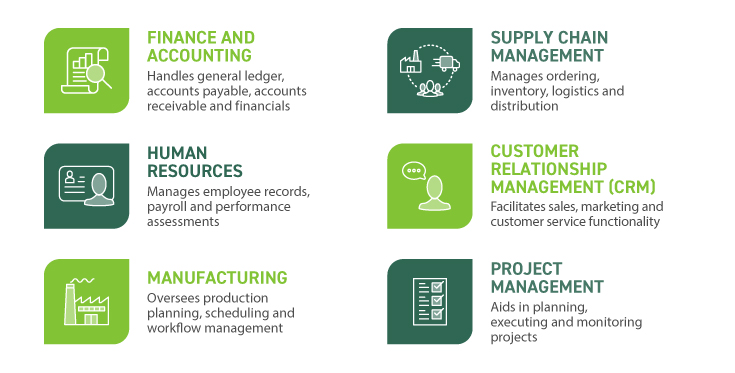
As mentioned above, an ERP system typically includes modules for finance functions, human resources, manufacturing, customer relationships, project management and supply chain management. These modules work in tandem to streamline processes and provide real-time insights into business operations.
ERP System Implementation Process: 6 Steps To Follow
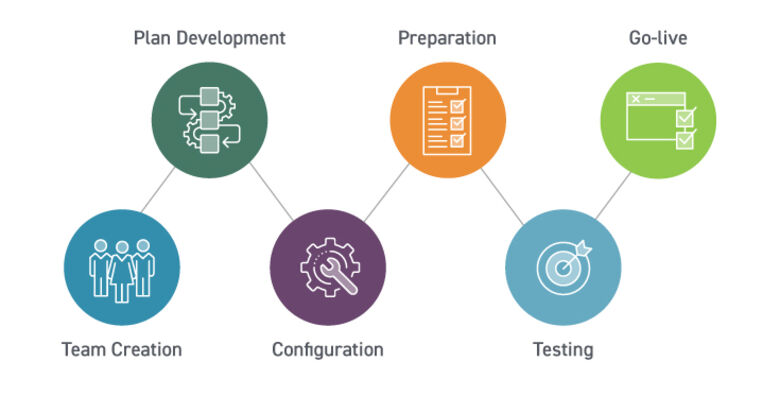
Successful implementation requires meticulous planning and execution. First, you will undergo an ERP selection process, during which you will conduct a needs assessment process evaluations. Once the selection process is complete, implementation typically follows the steps below.
Step 1: Assemble a Skilled ERP Implementation Team
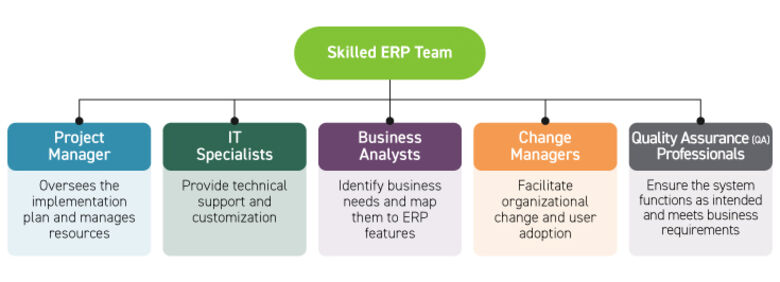
The success of an ERP project can be significantly enhanced by a skilled team with diverse skills, including:
- Project Manager: Oversees the implementation plan and manages resources.
- IT Specialists: Provide technical support and customization.
- Application Specialists: Provide in-depth knowledge of the ERP.
- Data Migration Professional: Help integrate data into new systems and cleanse duplicate or inaccurate files.
- Business Analysts: Identify business needs and map them to ERP features.
- Change Managers: Facilitate organizational change and user adoption.
- Quality Assurance (QA) Professionals: Ensure the system functions as intended and meets business requirements.
Clearly define each team member’s role and responsibilities during implementation.
Step 2: Develop a Detailed Program Charter and Implementation Plan
A comprehensive project plan serves as the blueprint for your ERP implementation. Key elements to establish include an implementation timeline, budget and risk mitigation strategies.
This step also requires an understanding of current workflows, so you can develop a functional design and relevant workflows for the new ERP. You may utilize a gap analysis to identify process issues and areas of the software that need customization.
Step 3: Configure the ERP System
With an ERP system selected and an implementation plan in place, it’s time to configure the software to suit your organization's needs. In this step, you will set up the structure, from the chart of accounts and cost centers to business units. Customization may also be necessary to support business processes and workflows. Defining user access controls and integrating the ERP with other systems, such as inventory management platforms or accounting software, will also happen in this step.
Step 4: Prepare for Data Migration
Data migration is a critical aspect that requires careful planning to prevent data loss or corruption. Consider cleansing your data — removing duplicate records and correcting errors — as well as mapping data structures from old systems to the new platform. Conducting migration tests to catch issues before fully transitioning your data will also be helpful.
Additional preparation tasks may include:
- Performing an audit of historical data
- Categorizing the types of data that need to be migrated
- Outlining a transfer method
- Testing the migration process
- Developing a recovery plan in the event of errors or data loss
Proper preparation reduces the risk of migration errors and provides reliable information that is compatible with the new ERP system. Appoint an experienced team to own this process and align migration with your organization.
Step 5: Complete Testing and Quality Assurance
Testing may be an ongoing effort during software development. Whether you perform testing in phases or wait until after implementation is complete, it’s crucial to thoroughly test the system for functionality and accuracy before go-live.
Key activities include:
- Unit and integration testing
- User acceptance testing (UAT)
- Load testing
- Validating migrated data
- Assessing system security
- Verifying compatibility with other systems and applications
Additionally, testing and quality assurance can encompass introductory user training and soliciting feedback from users.

Step 6: Go-live and Post-implementation Support
Once testing is complete and the system is ready to go live, you may deploy a soft launch with a small group of users tasked with catching any last-minute issues. Following a soft launch, you can roll out the system company-wide and conduct a post-implementation review to address any performance issues.
Factors to consider when deploying the ERP:
- Real-time user access
- Adequate security measures
- Data accuracy
- Streamlined workflows
Users may not immediately adapt to the new system, so allow time to achieve the anticipated productivity gains and ensure your implementation team is prepared to help employees with the transition.
Recommended Practices for a Successful ERP Implementation Plan
While the exact process and timeline can vary between companies, there are key factors decision makers should evaluate through the process to help ensure a successful ERP implementation:
Identifying Your Business Needs and Goals
Prior to implementation, it is paramount to have a clearly defined strategy and roadmap where the organization identifies its needs and goals.
Identifying the problems that need to be solved and what features and capabilities are necessary to support business operations will help organizations ensure the new ERP system is deployed correctly. This includes taking a comprehensive look at your old systems and identifying areas where improvements can be created by the new ERP system.
Engaging With Change Management Early
Change management is essential for mitigating resistance and enabling a smooth transition to new systems and workflows. A change management strategy encompasses the techniques required to prepare, equip and support individuals undergoing organizational change. A practical framework for change management includes the five Cs:
- Communication: Relay changes effectively to all levels of the organization.
- Collaboration: Involve employees in the change process to give them ownership.
- Commitment: Secure leadership commitment to support and drive change.
- Competence: Train and empower employees with the necessary skills.
- Culture: Foster a culture that is open and receptive to change.
Applying change management strategies can enhance the success of your ERP implementation project. Essential strategies can include assessing change readiness and developing a change plan.
To assess readiness, evaluate the organization's willingness and ability to adopt change. Secure executive leader buy-in to help foster a company culture that is receptive. Developing a change plan may also involve outlining specific steps and engaging all stakeholders, as well as clearly articulating how the ERP system will benefit different departments and roles.
Selecting the Right Partner
Ensuring the organization has the right resources and expertise in place to drive a change initiative of enterprise magnitude will be critical. Partnering with an experienced consultant specializing in ERP solutions can help guide an organization through every stage of the process to help maximize its investment.
Beyond understanding the intricacies and capabilities of various solutions, an ERP consultant needs to natively understand your business. Often, critical items that impact an implementation are lost in translation if there is not a comprehensive understanding.
Defining Key Roles and Governance
Ensuring you have the right leadership and consistent governance throughout the entire ERP project is paramount.
An ERP system involves all functional areas of a business, and thus, each area should have a lead stakeholder in place to plan, provide feedback, and oversee testing for their functional area. Functional lead stakeholders will be able to review project details from their practice perspective, plan for how next steps will impact performance, provide feedback and test nuances when needed.
Maintaining Strong Project Assurance
Up to 75% of ERP projects fail, according to Gartner, often due to inadequate planning and poor project governance. Project assurance provides an additional layer of security and confidence in your ERP implementation by ensuring each phase meets the intended quality standards. It involves continuous monitoring and active management of project elements to align strategies with business goals. It focuses on:
- Quality Assurance: Verifying that deliverables meet the specified requirements and business needs.
- Compliance: Ensuring adherence to industry standards and regulations.
- Resource Considerations: Confirming adequate resource allocation and optimal utilization.
To execute effective project assurance, follow these critical steps:
- Establish clear objectives and define what successful assurance looks like in the context of your ERP project.
- Hire experienced personnel and engage third-party professionals to conduct unbiased assessments.
- Implement ongoing assessments to identify deviations from the plan. Conduct regular audits to gather feedback and track project progress against objectives.
- Collect stakeholder feedback, while proactively identifying and addressing potential risks.
Enterprise Resource Planning Implementation FAQs
Learn more about implementing an ERP system with the answers to these frequently asked questions.
There are numerous advantages of using an enterprise resource planning system, but the key benefits include:
- Improved Data Collection and Hygiene
- Increased Support for Compliance Efforts
- Higher Productivity
- Streamlined Decision-making Processes
- Quicker Reporting
The complete timeframe for a system implementation will depend on the size of your business, the scope of the project and the platform chosen. However, it can take anywhere from a few months for a small business to several years for an international organization.
Like most forms of technology, an enterprise resource planning system should be routinely updated or upgraded to maximize function and ensure efficiency. The exact timing will depend on the business and the system used, but an upgrade/update should be considered every five to 10 years.
Of course, if you notice certain issues while using your ERP, it might need maintenance more frequently.
Hiring a third-party ERP consultant with robust implementation experience can enable a more successful software transformation, enhance the functionality of ERP systems and drive continuous improvement initiatives. Key benefits of a consultant include:
- Robust project execution and governance models and tools, in addition to expertise.
- Deep knowledge of industry-focused ERP systems and associated business processes.
- Technical skills to integrate and configure software.
- Ability to identify and mitigate project risks early in the process.
- Unbiased, vendor-neutral recommendations.
Additionally, ERP consultants can help advocate for and manage change within organizations. With the time-consuming nature of ERP implementations, working with a partner to manage the project allows you to focus on core business activities.
Implementing an enterprise resource planning software can come with common pitfalls. Awareness of such challenges can help you steer clear of issues that have derailed many ERP projects, such as:
- Lack of Leadership and Stakeholder Support: Success depends on executive involvement for communication, budget, resource allocation and governance. Without consistent leadership, ERP projects are likely to fail.
- Underestimating Time and Resources: ERP projects are complex and often take longer than expected. Set realistic timelines, plan out how to use your resources and anticipate talent turnover to avoid failure.
- Inadequate Training: Insufficient user training strains support resources and reduces the effectiveness of the new system. Provide ongoing, role-based training beyond go-live to support user adoption.
- Lack of Testing: Insufficient testing can disrupt daily operations and undermine user trust. Conduct early and continuous testing, using automation to detect and address issues promptly.
How Cherry Bekaert Can Guide You Forward
Integrating an ERP system into your business enhances agility, scalability and competitiveness, empowering organizations to adapt to dynamic market conditions and drive growth effectively. Cherry Bekaert can help your organization with digital transformation or ERP-related issues. This includes strategy development, validation, selection and project assurance. To learn more about how we can help with your ERP system implementation and deployment, please reach out.